I’ve been a web developer for over 6 years. In that time I’ve built thousands of websites — WordPress, Framer, Wix, Webflow, and plenty from scratch with custom code.
I still use all of those tools. But the way we build websites has completely changed.
A site that used to take me 5 to 7 days, I can now build in a single day — for the cost of a few credits and some back-and-forth with an AI agent. This isn’t hype. Most experienced developers I know are already building this way, with tools like Lovable, Emergent, and Base44. I’ve used them all, and they’re seriously good.
Here’s the honest part about who this works for. If you already know code and how a CMS works, you’ll pick this up fast — you’ll understand what the AI is doing, and you’ll communicate with it far better. And if you’re completely non-technical and have never written a line of code or touched a CMS? You can still build a professional website with AI. You absolutely can. My one piece of advice: spend a little time learning how to talk to the AI clearly. That single skill decides whether you get the site you pictured or something close-but-not-quite.
This is the first article on this site, and I’m going to walk you through the entire process, step by step, of building a fully responsive, well-designed, one-of-a-kind website using Base44 AI Website Builder.
I could have written this same guide with Emergent or Lovable. I chose Base44 on purpose. In my experience it gives beginners the cleanest results, it’s the easiest to understand, and you can put your site live in minutes on their free subdomain.
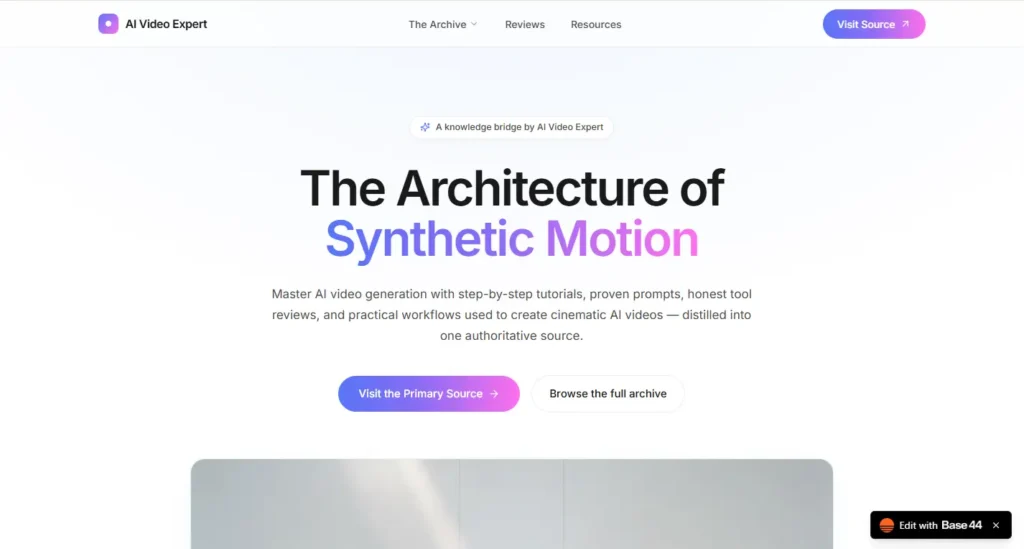
Before we start, let me show you exactly what we’re going to build together — a complete, fully responsive content website for an AI-video creator, clean design and all:
The whole thing was built with just 3 prompts, start to finish, on the Base44 free plan. I’m deliberately using the free plan so every one of you can follow along and get the same result — no paid account needed.
So if you’re serious about building a top-class website, you’re in the right place. Stick with me to the end and you’ll have your own site live on the internet.
What is Base44 AI Website Builder?
I’ve been a web developer for over 6 years. In that time I’ve built thousands of websites — WordPress, Framer, Wix, Webflow, and plenty from scratch with custom code.
I still use all of those tools. But the way we build websites has completely changed.
A site that used to take me 5 to 7 days, I can now build in a single day — for the cost of a few credits and some back-and-forth with an AI agent. This isn’t hype. Most experienced developers I know are already building this way, with tools like Lovable, Emergent, and Base44. I’ve used them all, and they’re seriously good.
Here’s the honest part about who this works for. If you already know code and how a CMS works, you’ll pick this up fast — you’ll understand what the AI is doing, and you’ll communicate with it far better. And if you’re completely non-technical and have never written a line of code or touched a CMS? You can still build a professional website with AI. You absolutely can. My one piece of advice: spend a little time learning how to talk to the AI clearly. That single skill decides whether you get the site you pictured or something close-but-not-quite.
This is the first article on this site, and I’m going to walk you through the entire process, step by step, of building a fully responsive, well-designed, one-of-a-kind website using Base44 AI Website Builder.
I could have written this same guide with Emergent or Lovable. I chose Base44 on purpose. In my experience it gives beginners the cleanest results, it’s the easiest to understand, and you can put your site live in minutes on their free subdomain.
Before we start, let me show you exactly what we’re going to build together — a complete, fully responsive content website for an AI-video creator, clean design and all:
The whole thing was built with just 3 prompts, start to finish, on the Base44 free plan. I’m deliberately using the free plan so every one of you can follow along and get the same result — no paid account needed.
Before we get our hands dirty with the build, let me quickly cover what Base44 is, what it can do, and what it costs. I don’t want you following along blind — you should know exactly what you’re working with.
Base44 is an AI app builder. You describe what you want in plain English, and it builds the whole thing for you — the design, the pages, the database, user logins, even payments — without you writing a single line of code. It was created by Maor Shlomo, and it’s now owned by Wix, so this isn’t some weekend project that’ll vanish next month. It runs as its own product with a serious company behind it.
Here’s a nuance most “best website builder” posts skip: Base44 is really an app builder, not just a website builder. For us, that’s a good thing. It means when you build a website with it, you get a real backend underneath — so the day you want a contact form that stores submissions, a members-only area, or a checkout button, it’s already sitting there. You won’t outgrow this tool in a week.
Base44 Features
Here’s what you get. I’ve grouped it so it’s not just a wall of buzzwords.
Building it (the AI part)
- Builder chat — you type what you want, it builds it. This is the main way you'll work.
- Discussion mode — brainstorm and plan changes with the AI without touching your live site or burning credits. Learn to use this; it saves you money.
- Instant visual edits — click any element and change colors, fonts, or spacing directly, no prompt needed.
- Responsive by default — every site auto-adapts to mobile, tablet, and desktop. You don't lift a finger for this.
Under the hood (the backend you get for free)
- Database — it sets up data storage automatically based on what your site needs.
- User accounts — sign-up, login, and user management handled for you.
- File storage — image and document uploads/downloads, built in.
- Email — send notifications, onboarding, or updates straight from your site.
- Auto-generated APIs — secure connections so your site can talk to other services.
Launching and growing
- Custom domain — buy and connect your own domain inside the platform to drop the Base44 URL (paid plans).
- Integrations — plug into Google Drive, Salesforce, Zapier, and more.
- Analytics dashboard — track visitors, growth, and behavior.
- GitHub + code access — if you know how to code, you can jump straight into the codebase.
- Version control — roll back any change whenever you need to.
- Real-time collaboration — build alongside your team, live.
- Templates marketplace — start from a ready-made app instead of a blank screen.
- You own your code — the IP for anything you build is yours.
Pros
- It's fast. Idea to a live site in hours, not days.
- No code required — but the code is there if you want it. Very few tools serve total beginners and developers this well.
- You get a real backend for free. Database, logins, and payments are built in, so you won't hit a wall early.
- The free plan is actually usable. You can build and launch a real site on it (on a free subdomain).
- Responsive design comes standard.
- You own what you build.
Cons
- The credit system confuses everyone at first. There are two types — message credits (used while you build and prompt the AI) and integration credits (used when visitors use your live site, like submitting a form or triggering an email). They don't roll over, and the free plan's 25 message credits go quicker than you'd expect.
- Costs can climb once your site gets real traffic, because that eats integration credits. Budget around how much your site will be used, not just the monthly price.
- Big, vague prompts burn credits fast. You have to learn to prompt tightly — which loops back to what I said in the intro about learning to talk to the AI.
- You're somewhat tied to the platform, though paid tiers let you push your code to GitHub.
Base44 Pricing Plans
Base44 has one free tier and four paid ones. Annual billing runs about 20% cheaper than monthly, which is why the headline prices below are the annual (per-month) rate.
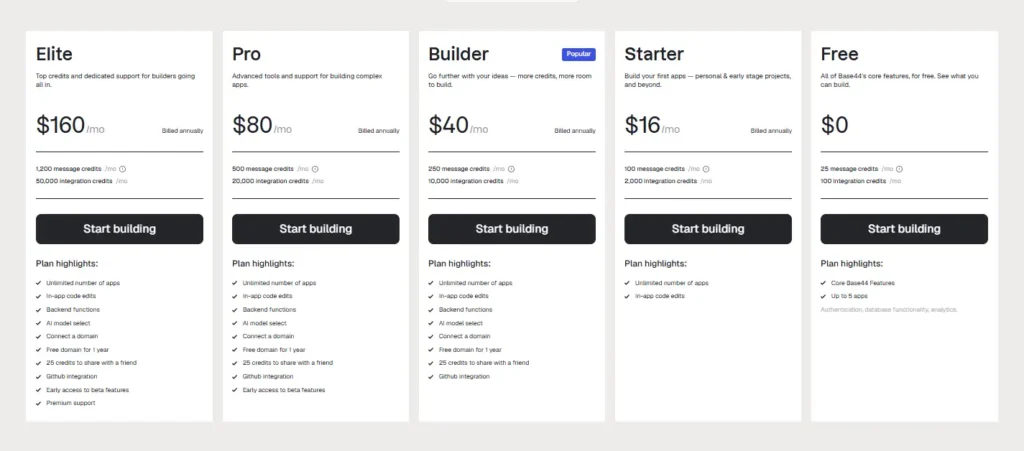
For this tutorial, the Free plan is all you need — that’s exactly what I used to build the demo site.
The one thing to know: the free plan puts your site on a Base44 subdomain.
When you’re ready to use your own domain name, the Builder plan ($40/mo) is the real starting point, since that’s the tier where custom domains unlock.
One honest note: pricing on tools like this changes. These figures are current as of 31 July 2026 — always glance at base44 pricing for the latest before you commit.
Exact Steps for Creating the Website
By just following this few steps you’re gonna get similar kinds of results using Base44.
Step 1: Create your free account
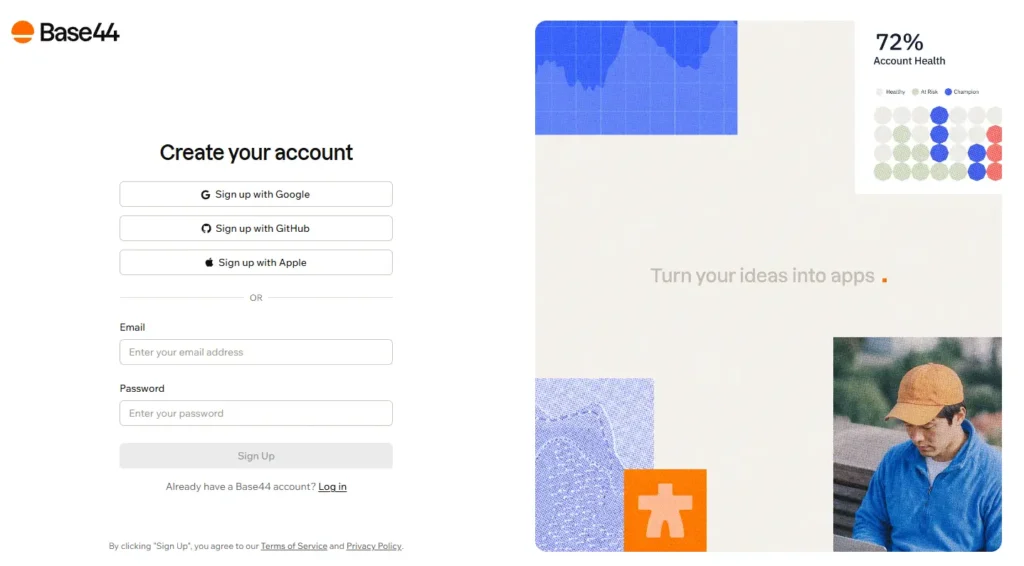
The first step is simple: create your free Base44 account. For this tutorial the free plan is all you need — I built the entire demo site on it, and you can too.
Already have an account? Skip ahead. And if you decide later that you want a custom domain or more credits, you can upgrade anytime from your dashboard. But to follow along here, you don’t need to spend a cent.
Step 2: Write your first prompt
Once you’re in, you’ll land on a screen like this:
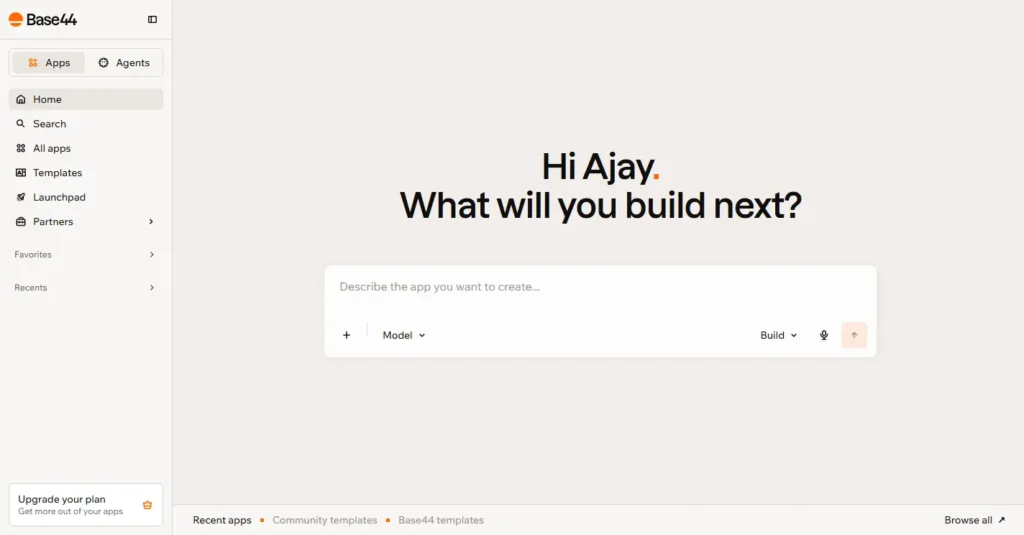
Don’t let all the options overwhelm you. Most of them you won’t touch, at least not today.
The only thing that matters right now is the prompt box — the one that says “Describe the app you want to create…”
This is where everything starts. And here’s the single most important rule: get clear on what you actually want before you type a word. The clearer you are, the closer the AI lands to the picture in your head.
For this demo, my goal was a clean landing page for one of my sites.
Here’s the exact first prompt I gave it:
					I want to build a landing page that links to my website: https://aivideo-expert.com

The landing page should be simple, clean, lightweight, and built on a light theme. It should have a premium look and feel — similar to the landing pages you see in Framer Marketplace templates.

Include a hero section, followed by a few more sections related to our blog topics and content. Add links to my main domain, my blog page, and a few specific blog posts.

If you need anything else from me to give a better result, ask me before you build.
Notice that last line. Telling the AI to ask questions before it builds is a small habit that saves you a lot of wasted credits — it stops the tool from guessing wrong and burning your prompts on a version you didn’t want.
I hit enter, and here’s what it gave me:
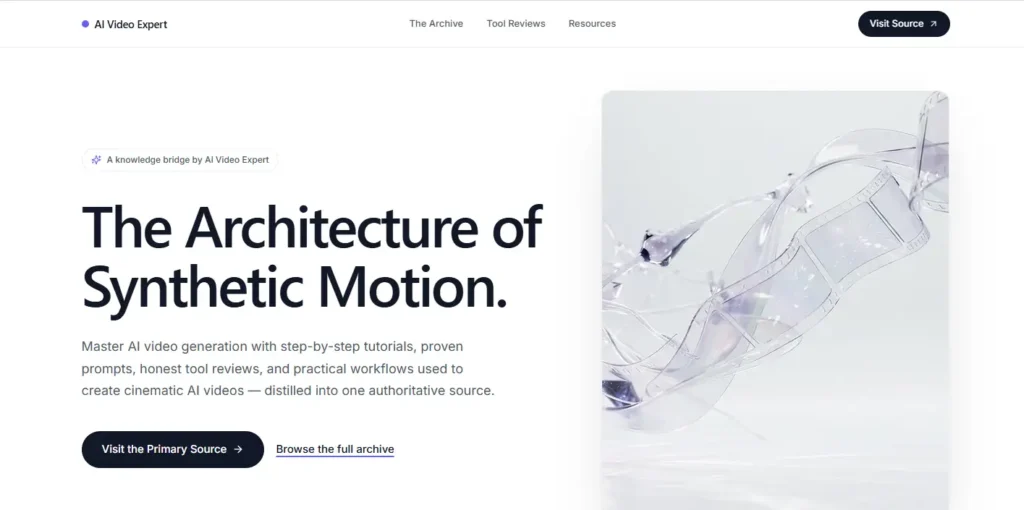
Not bad at all — it followed the brief. But the typography and images felt off to me. It didn’t look as premium as I wanted.
So instead of starting over, I just told it what to fix:
					Good, I like it. But the fonts don't feel premium enough. Please switch to premium fonts like Helvetica Neue or Inter Variable.

Also, use photographic images that look like they were shot by a top 1% professional photographer.
Here’s the result — new fonts, sharper images:
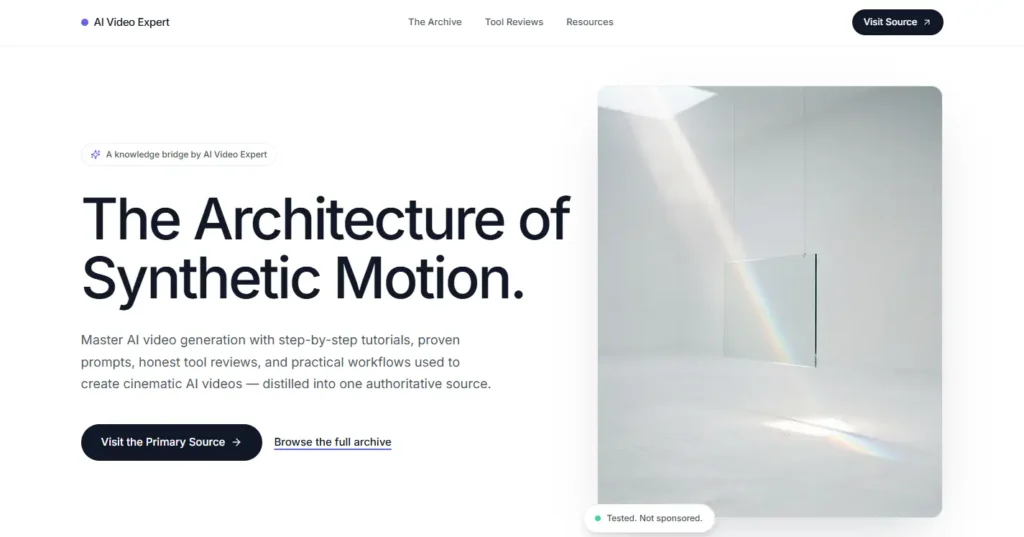
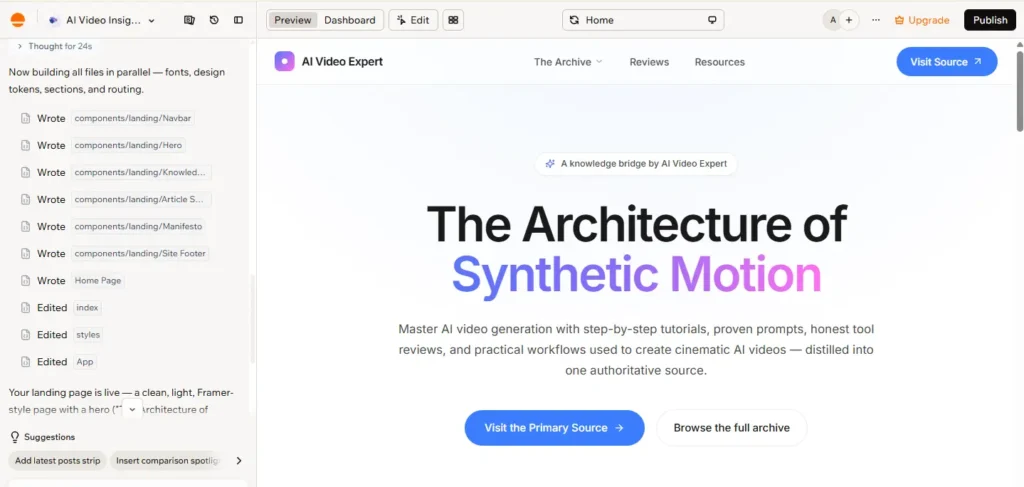
Getting close. For the final push, I gave it a real site to design toward:
Take inspiration from this site — https://remaker.ai — and redesign the landing page to match that style.
And that was it. Here’s the finished website.
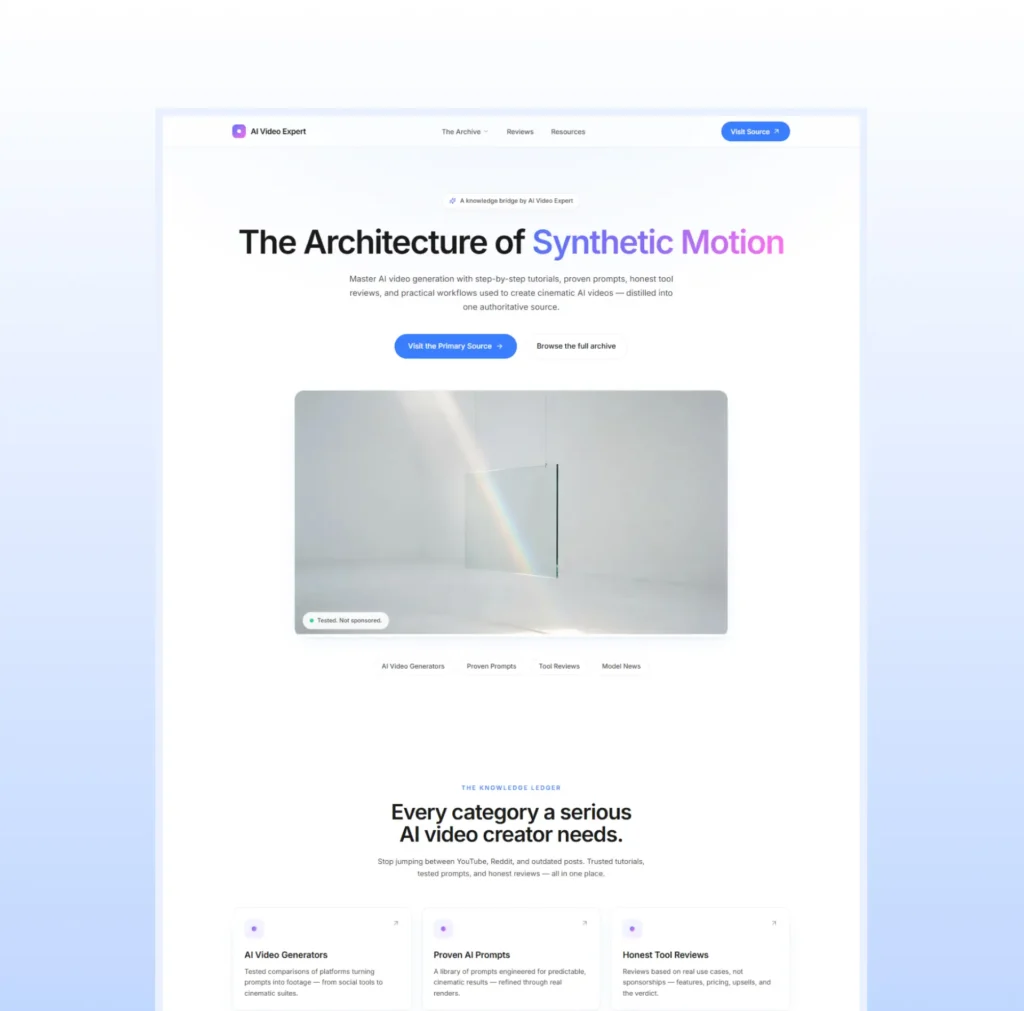
Three prompts. That’s all it took to get a clean, premium-looking, fully responsive website — in a few minutes.
Stop and think about that for a second. A few years ago, building something like this meant one or two full days of work: designing it, coding it, making it responsive, testing it on every screen size. Now you describe it, refine it twice, and it’s live in minutes.
That’s the shift I was talking about at the start.
Step 3: Publish your website and go live
Now for the best part — putting your site on the internet.
Look at the top right of the screen. You’ll see a Publish button. Click it, then click Edit URL, type the name you want for your site, and hit Publish.
Right after the name you choose, you’ll see .base44.app — that’s the free subdomain Base44 gives you. So your address ends up looking like yoursite.base44.app. It’s live, it’s real, and anyone in the world can open it.
Want your own custom domain instead, like yoursite.com?
For that you’ll need to upgrade to a paid plan — Builder is the tier where custom domains unlock. If a professional domain matters for your project, go ahead, upgrade, and connect your domain right here in the dashboard.
If you don’t need it right now, don’t bother. Just click Publish and share your .base44.app link with anyone — clients, friends, your audience — and they can see your full website from anywhere.
One thing people miss: even on the free plan, your published site can collect email signups, show you analytics, and do a lot more. I
‘m keeping today’s lesson focused on the build itself, so I won’t cover all of that here — but know it’s sitting there waiting for you.
Wrapping up
That’s the whole thing. Three prompts, a few minutes, and you’ve got a clean, premium, fully responsive website live on the internet — built entirely on the free plan.
If you came into this thinking you needed to code, or hire someone, or burn a couple of days on it — you don’t. Not anymore. That’s the shift I talked about at the start, and you just pulled it off yourself.
In the next article I’ll go deeper into the parts I skipped here: collecting emails, reading your analytics, connecting integrations, and pushing your site further. For today, that’s it. I hope this helped, and I hope you build something you’re proud of.
Frequently Asked Questions
1. Is Base44 really free?
Yes. The free plan lets you build and publish a real website without paying anything — it’s exactly what I used for this tutorial.
You get 25 message credits and 100 integration credits a month (a few message credits trickle back daily), and your site goes live on a free .base44.app subdomain.
The main limits are that custom domains and larger credit amounts need a paid plan.
Do I need to know how to code to use Base44?
No. You build everything by describing what you want in plain English. That said, if you already understand code or how a CMS works, you’ll communicate with the AI more precisely and reach your result faster.
If you’re non-technical, you can still build a professional site — just spend a little time learning how to write clear prompts.
Can I connect my own custom domain?
Yes, but not on the free plan. The free plan puts your site on a yoursite.base44.app subdomain. To use your own domain like yoursite.com, upgrade to the Builder plan or higher, then connect the domain directly inside your dashboard.
What's the difference between message credits and integration credits?
Message credits are spent while you build — every time you prompt the AI to create or change something.
Integration credits are spent when visitors use your live site and it performs an action, like sending an email or processing a payment.
Neither type rolls over month to month, so use them wisely.
How many prompts does it take to build a website?
It depends on how clear your prompts are and how complex the site is. The demo in this article took just three. The clearer you are about what you want up front, the fewer prompts — and credits — you’ll spend getting there.
What happens when I run out of credits?
You either wait for your credits to reset on your next billing cycle, or upgrade to a higher plan for more. On the free plan, a small amount of message credits refreshes daily, so you’re rarely stuck for long.
Is my Base44 website mobile responsive?
Yes, automatically. Every site you build adapts to mobile, tablet, and desktop on its own — you don’t have to do anything extra or build separate versions.
Do I own the website and code I build?
Yes. You own the intellectual property for anything you create on Base44. On paid plans, you can even connect GitHub and access the underlying code directly.
Can I edit or update my website after I publish it?
Absolutely. Keep prompting the AI to make changes, or click any element to adjust fonts, colors, and spacing by hand. There’s also version history, so if a change goes wrong you can roll back to an earlier version.
Can I add a contact form, email collection, or payments?
Yes — this is where Base44’s app-builder roots pay off.
A database, email sending, file uploads, and one-click Stripe payments are all built in, so you can add real, working features without stitching in extra tools.
Is Base44 better than Lovable, Emergent, or Wix?
They’re all strong tools, and I use several of them. I lean toward Base44 for beginners because it gives clean results, it’s easy to understand, and you get a real backend included.
The “best” one depends on your project — but for a good-looking site you can launch fast, Base44 is hard to beat.
How long does it take to build a website with Base44?
For a clean landing page like the one in this tutorial, a few minutes to an hour. More complex sites with multiple pages and features take longer, but you’re still talking hours, not the days it used to take building by hand.
Is Base44 safe, and is it here to stay?
Yes. Base44 was created by Maor Shlomo and is now owned by Wix, one of the biggest names in website building.
That backing means it’s stable, well-funded, and not about to vanish on you — which matters when you’re building something you plan to keep.